
However good your product is, organic visibility is limited in the first months of private label selling on Amazon US. With millions of listings competing, waiting for a new ASIN to be discovered on its own is not a realistic strategy. This is where PPC (Pay Per Click) advertising comes in: it drives sales and, just as importantly, builds the sales velocity that feeds organic ranking. A well-structured Amazon PPC management setup can act as the brand's growth engine from the first day of launch. For more detail, see our article Amazon Service: The Path to Success in Cross-Border E-Commerce.

In this guide we walk step by step through campaign types, match types, bid and placement math, how to optimize the Search Term Report in Excel, and how to connect Brand Analytics data to your strategy, as we apply them in practice. For our service scope on Amazon, from account setup to listings and operations, visit our Amazon service page.
Campaign Types: Sponsored Products, Brands and Display
Amazon Advertising offers three main ad formats, and each plays a different role in the funnel:
- Sponsored Products: Single-product ads that appear in search results and on product detail pages. For private label sellers, usually 70-80% of the budget runs here; it is the main source of sales.
- Sponsored Brands: Appear above search results with the brand logo, a headline and multiple products. They require Brand Registry and are used for brand awareness and Store traffic.
- Sponsored Display: Retargets shoppers who visited your product page without buying and provides visibility on competitor ASIN pages. It usually makes more sense to activate it at a later stage of the launch.
Automatic vs. Manual Campaigns
Sponsored Products has two targeting methods. In an automatic campaign, Amazon looks at your listing content and decides which searches to show the ad for; four targeting groups run: close match, loose match, substitutes and complements. In a manual campaign, you set the keywords and bids yourself.
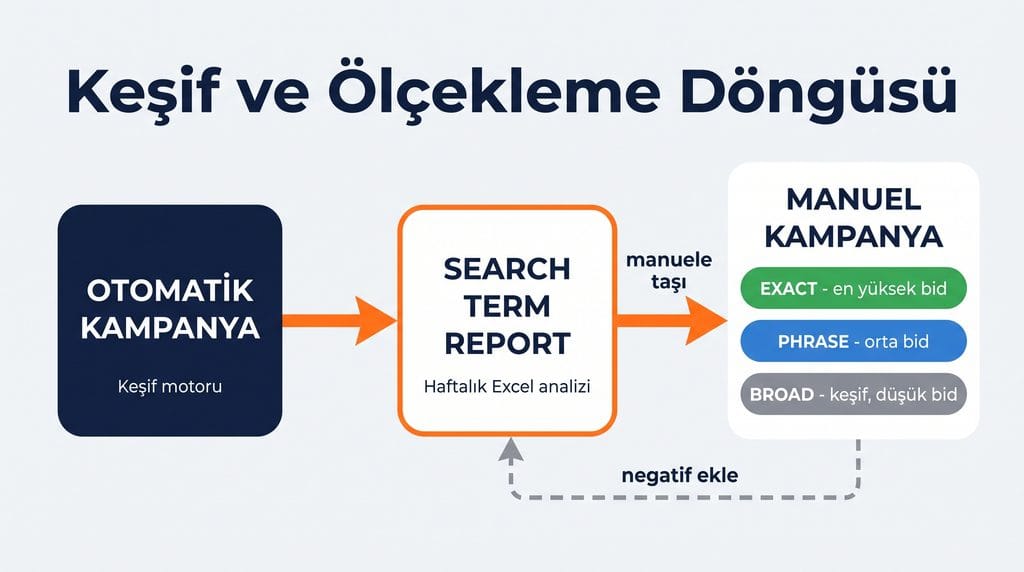
The standard setup is this: at launch, an automatic campaign runs as a discovery engine and collects data for 2-3 weeks; search terms that convert are moved into a manual campaign. The automatic campaign is not paused at this point; it continues its discovery role on a low budget. This cycle (discover, harvest, migrate) is the backbone of PPC management. To see how we handle launch setup and advertising management, visit our Amazon Launch and Advertising page.
Match Types: Broad, Phrase, Exact
| Match Type | How It Works | Purpose |
|---|---|---|
| Broad | Words match in any order, including synonyms and close variations | Wide discovery, with low bids |
| Phrase | The phrase matches in the same order; words can be added before or after | Controlled discovery, medium bids |
| Exact | The search term matches exactly (or as a very close variation) | Proven keywords, highest bids |
Let's make this concrete with an example. Say your keyword is “bath towels”:
- Exact: Shown only for the search “bath towels” (and very close variations such as singular/plural, e.g. “bath towel”). Traffic arrives in its narrowest, most controlled form.
- Phrase: The phrase “bath towels” is kept in the same order; words can be added before or after it: “black bath towels”, “bath towels for hotel”, “best bath towels 2026”. The phrase itself stays intact.
- Broad: Words can appear in any order, and new words can be added before, after, or between them: different combinations such as “black organic cotton bath towel” or “towel set spa style” also match. This is where the widest traffic comes from and the main source for discovering long-tail searches, but it also carries the highest risk of irrelevant matches.
Practical principle: set up the bid hierarchy as exact > phrase > broad. If the same keyword exists in all three match types, you want traffic to flow to the most efficient (exact) campaign; adding that keyword as a negative in the broad campaign to steer traffic is a common technique.
Bid Math: CPC, Dynamic Bidding and Placement Settings
Amazon PPC is an auction system. CPC (Cost Per Click) is the amount you pay per click, and you usually pay not your full maximum bid but just slightly more than the next highest bid. In other words, your bid is a ceiling price, and the actual CPC often comes in below it.
Dynamic Bidding Strategies
- Down only: Amazon lowers your bid on clicks that appear less likely to convert. This is the recommended default for the early launch period; while reviews and social proof are still limited, conversion rates naturally run lower, so it makes more sense to keep the budget in check than to go aggressive at this stage.
- Up and down: If the likelihood of conversion is high, the bid can be raised by up to 100%; if it is low, the bid is reduced. It works well in proven exact campaigns but can use up the budget quickly.
- Fixed: The bid stays the same. It can be a good choice for controlled tests.
Placement Setting: Top of Search Percentage
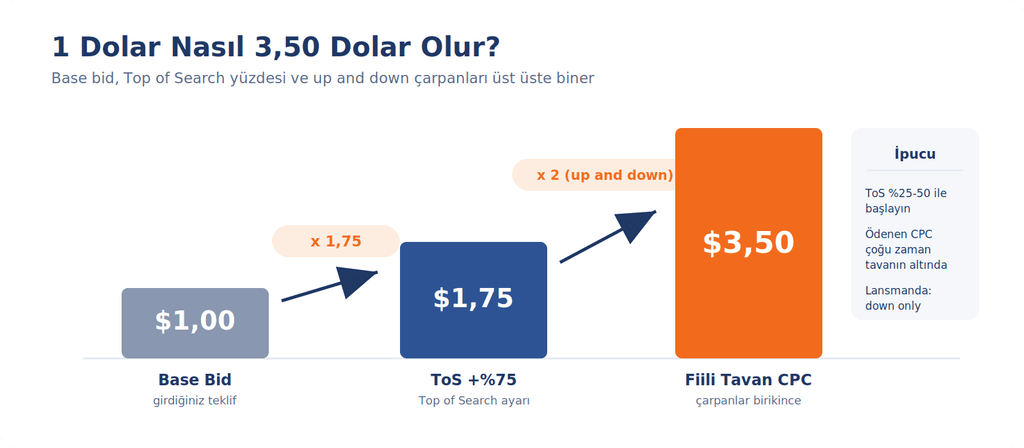
In campaign settings you can set a separate percentage increase for three placements: Top of Search (the top of the first page), Rest of Search and Product Pages. This is the setting where you say “raise my bid by X% when my product appears at the top of the first page.” Knowing the math here matters, because the multipliers stack:
Example: a base bid of 1.00 USD + a Top of Search setting of 75% = a 1.75 USD ceiling. If the up and down strategy is added on top, Amazon can raise this by up to 100%: 1.75 x 2 = 3.50 USD. So a 1 dollar bid can turn into a 3.50 dollar click without you noticing. It is healthier to raise the placement percentage gradually (starting in the 25-50% range), based on that placement’s actual conversion data.
How Is the Maximum Bid Calculated?
Roughly, the formula is: Maximum CPC = Product sale price x Conversion rate (CVR) x Target ACoS. For example, for a 14.99 USD product with a 12% conversion rate and a 30% target ACoS: 14.99 x 0.12 x 0.30 = 0.54 USD. This is the ceiling cost per click you can pay on that keyword while protecting your profit target. During launch you may deliberately go above this ceiling, as long as you know it is an investment decision.
Tracking Metrics: ACoS, TACoS, CPC, CTR, CVR
| Metric | Definition | Practical Interpretation |
|---|---|---|
| ACoS | Ad spend / sales from ads | The target is set based on your profit margin |
| Break-even ACoS | The ACoS level equal to your profit margin | Below it is profit, above it is loss (on an ad basis) |
| TACoS | Ad spend / total sales (including organic) | If it falls over time, organic sales are getting stronger |
| CPC | Cost per click | An indicator of competition at the keyword level |
| CTR | Clicks / impressions | If low, there may be an issue with the main image, price or title |
| CVR | Orders / clicks | If low, there may be an issue with the listing content or reviews |
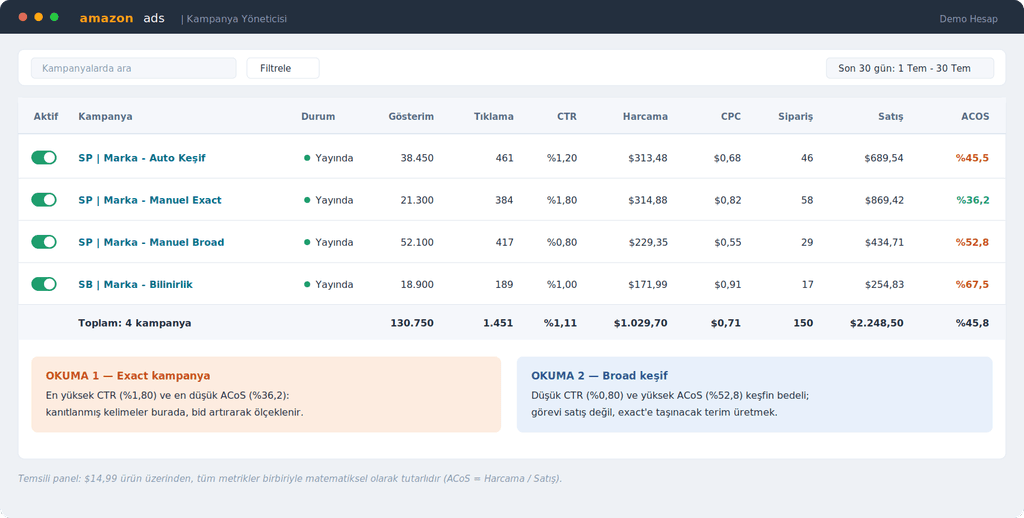
Example: if your profit margin is 35%, your break-even ACoS is 35%. Running at 45-60% ACoS during launch (to build visibility and reviews) is normal; in the mature phase, the target is usually brought down to the 20-30% range.
ACoS Alone Is Not a Measure of Success
A common mistake here is reading ACoS as an absolute measure of success. The same 25% ACoS means very different things for a 200 USD product and a 15 USD product; click costs, margin structure and ad spend per order are completely different. Your reliable reference point is always your own profit margin, not other sellers’ ACoS figures in the category.
Ad performance is also not only the result of campaign settings. Your pricing in that niche, the quality of your main image (which directly affects CTR), your title and your review status are all part of the equation. If the metrics are low, the fix is not always in the bid; sometimes it is on the listing side: a stronger main image lifts CTR, more persuasive content and price positioning lift CVR, and the same budget can produce a much better ACoS.
TACoS: The Real Health Indicator of Advertising
TACoS (Total Advertising Cost of Sales) divides ad spend not only by sales from ads but by total sales, including organic. Example: if 1,000 USD of monthly ad spend produces 2,000 USD in ad sales, ACoS is 50%; but if your total sales are 5,000 USD, TACoS is 20%. Because PPC feeds organic ranking, this is the trend that really matters: if TACoS falls over time while ACoS stays flat, advertising is successfully feeding the organic engine. If TACoS rises month after month, growth may be becoming more dependent on ads, and it may be worth reviewing the listing and organic side.
Optimizing with Excel: The Search Term Report Cycle
The kitchen of PPC optimization is the Search Term Report, downloaded in Seller Central under Reports > Advertising Reports. You bring this report into Excel weekly (twice a week during launch) and run a three-step cycle:
- 1) Negative cleanup: In a pivot table, sort search terms by spend. Add terms that received a meaningful number of clicks (for example 10-15) but produced no sales as negative exact. This is where the budget’s silent leak is stopped.
- 2) Harvest: Move terms from automatic and broad campaigns that produced 2 or more orders with an ACoS below target into a manual exact campaign; add the same term as a negative in the source campaign.
- 3) Bid adjustments: A simple rule set is enough: if ACoS is clearly below target, raise the bid by 10-15% (to gain impression share); if it is above target, lower it by 10-15%; if a term gets no impressions at all, raise the bid gradually. Terms with a high conversion rate but a low CPC are usually the most valuable opportunity; scaling this cheap, converting traffic by raising bids can produce considerably more sales from the same budget. Small, regular steps instead of big jumps keep the data readable.
The strength of this loop lies in its discipline, not its complexity. Using the same Excel template every week makes your campaign history readable at a glance.
Brand Analytics: Connecting Data to Strategy
Brand Analytics, available to sellers enrolled in Brand Registry, is the compass of PPC. The Top Search Terms report shows the actual search volume ranking in your category and the click share / conversion share of the three most-clicked ASINs for each term. It lets you build your keyword list from Amazon's own data rather than guesswork. Search Query Performance breaks down your brand's impression, click and purchase funnel for each query, clearly showing where you gain visibility but lose conversions. Combined with the Search Term Report, these two reports turn bid decisions from estimates into data-driven decisions. For details on the Brand Registry process, the prerequisite for Brand Analytics access, see our Amazon Brand Registry and Transparency guide.
Weekly Amazon PPC Management Routine: Summary Table
| Frequency | Action |
|---|---|
| Twice a week (launch) | Download the Search Term Report, run the negative and harvest loop |
| Weekly | Bid adjustments (in 10-15% steps), check budget depletion times |
| Weekly | Placement report: Top of Search conversion vs. percentage adjustment fit |
| Monthly | Update the keyword list with Brand Analytics, check the TACoS trend |
| Monthly | Review campaign structure, evaluate Sponsored Display retargeting |
Frequently Asked Questions (FAQ)
What should the ideal ACoS be?
There is no single right number; your reference point is your profit margin. An ACoS equal to your margin is the break-even point. Common targets are 45-60% at launch and 20-30% at maturity.
When should an automatic campaign be turned off?
Usually it is not. Even after manual campaigns carry the main load, an automatic campaign with a low budget keeps discovering new search terms.
Is broad or exact better?
They are complementary, not competing. Broad discovers, exact harvests. The budget and bid hierarchy is set in favor of exact.
What should I set the Top of Search percentage to?
If your Top of Search conversion in the placement report is clearly higher than other placements, starting at 25-50% and increasing gradually makes sense. Remember to account for the multiplier effect (up to 2x) when combined with the up and down strategy.
Is organic ranking possible without PPC?
In theory yes, but in practice it is quite difficult for a new ASIN. PPC generates sales velocity, and sales velocity supports organic ranking; the two work together.
Conclusion
Amazon PPC is not a complex science; it comes down to a well-built structure (auto + manual, an exact-first bid hierarchy), a few core formulas (break-even ACoS, maximum CPC) and a disciplined weekly Excel loop. The hard part is not the technique but consistency. If you would like to look at the private label journey as a whole, our Amazon Private Label Starter Guide is a good starting point.
As an Amazon SPN Verified Partner, we provide end-to-end support for launch, PPC advertising management and account operations on Amazon US. If you would like to plan the right campaign setup for your product together, feel free to contact us.

