
An Amazon Black Friday campaign is a seller's way of featuring a product during the late-November Black Friday and Cyber Monday period with a promotion such as a Lightning Deal, Best Deal, Prime-exclusive discount or coupon. Most of these promotions are set up in Seller Central weeks in advance, and the inventory usually needs to be in an Amazon warehouse by a specific date.
Being visible during the busiest sales week of the year is attractive, but there is another side to it: submission windows close early, the promotion's upfront fee is charged regardless of sales, and the discount level can run into Amazon's pricing rules. In 2026, deal submissions in the U.S. close on October 20; in Germany the deadline is November 18.
In this article we first cover the calendar and promotion types, then explain which Seller Central menu and which steps are used to set up each one. The information comes from Amazon's own announcements and seller guides; menu names and fees change from time to time, so what you see on screen during setup should be treated as the reference.
When are Black Friday and Cyber Monday on Amazon?
In the U.S., Black Friday 2026 falls on Friday, November 27, and Cyber Monday on Monday, November 30. Amazon does not squeeze its discounts into a single day; it opens a window of roughly 12 days under the name "Black Friday Week."
Amazon had not yet announced its 2026 window when this article was prepared. For reference: in 2025 the window ran from November 20 to December 1, and in 2024 from November 21 to December 2. In Germany the same period is called "Black Friday Woche."
When do Black Friday deal submissions close?
Submissions open months before the event and close weeks before it. Inventory dates also refer to when the product arrives at the Amazon warehouse, not when it ships.
| Calendar (2026) | Amazon US | Amazon Germany |
|---|---|---|
| Deal submission | July 8 to October 20 | Until November 18 |
| Early submission discount | Ended September 5 (50 USD off the upfront fee) | Ended September 5 (30 percent off the upfront fee) |
| Inventory arrival at warehouse | AWD October 14, FBA between October 21 and 28 | European warehouses around October 21 (UK October 28) |
| Peak season fulfillment surcharge | October 15, 2026 to January 14, 2027 | October 15, 2026 to January 14, 2027 |
For an ocean shipment from overseas, these dates can mean loading as early as the beginning of September. If inventory will not make it in time this year, moving forward with coupons and price discounts instead of a deal may be the more practical choice.
What promotion types are available on Amazon?
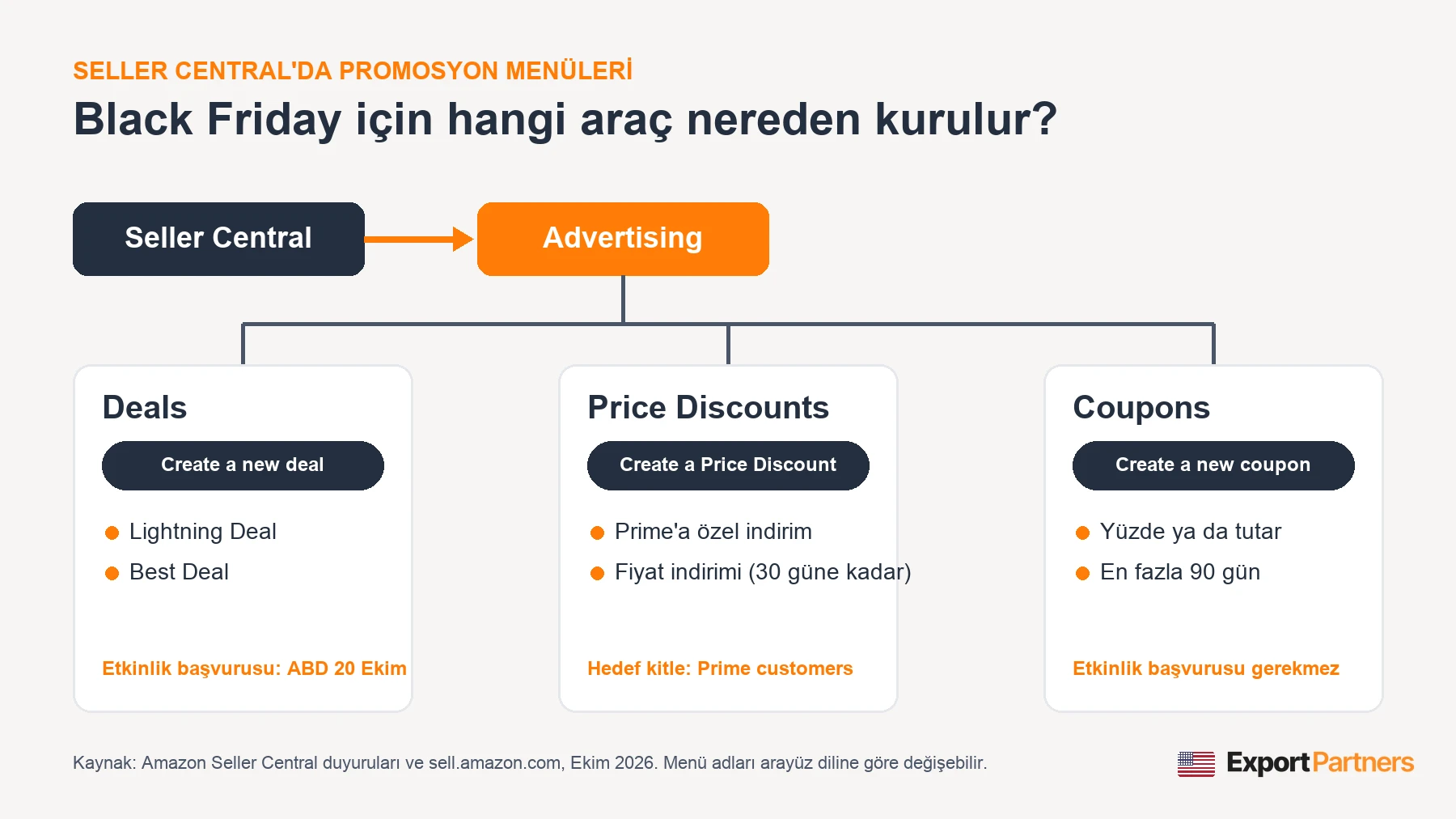
Sellers have four tools. Lightning Deals and Best Deals are discounts that appear with an event badge on Amazon's Deals page. A coupon shows up on the product page as a "clip coupon" box. A Price Discount lowers the price directly for a set period; Prime-exclusive discounts are now also set up through this tool.
| Promotion | Who can set it up | Duration | Seller Central menu |
|---|---|---|---|
| Lightning Deal | Professional plan, seller rating of at least 4 stars, products selected by Amazon | 4 to 12 hours, set by Amazon | Advertising > Deals |
| Best Deal | Professional plan, seller rating of at least 4 stars | A few days | Advertising > Deals |
| Prime-exclusive discount | On eligible products | Depends on the event | Advertising > Price Discounts |
| Coupon | Professional plan, seller rating of at least 3.5 stars | Up to 90 days | Advertising > Coupons |
| Price discount | Not every SKU is eligible | Up to 30 days | Advertising > Price Discounts |
Which one to choose depends on the product's review count, inventory depth and margin. For a newly listed product with few reviews, Lightning Deals are often not available; coupons and price discounts tend to be more accessible starting points.
How do you set up a Lightning Deal and a Best Deal, step by step?
Both deal types are created from the same screen: in Seller Central, go to Advertising > Deals and click Create a new deal. The flow runs as follows:
- Product selection: The screen lists the products Amazon considers eligible for a deal (recommended deals). Select a product and click “Select”. If the list is empty, the account has no eligible products at that moment.
- Deal type and timing: Choose Lightning Deal or Best Deal, then enter the period the deal will run.
- Price and quantity: Enter the deal price or the discount per unit. For a Lightning Deal, also enter the minimum number of units to be sold during the deal (minimum deal quantity).
- Image: Select the main product image to be shown on the Deals page.
- Fee: The promotion fee is shown on screen; review it.
- Submission: Review each section and submit the deal for review. For products with variations, detailed edits are made through “Advanced Edit”.
Germany and the other European marketplaces share a common Deals screen; when creating the deal, you choose which store (Germany, UK, France, etc.) it will run in. Because menu names change with the interface language, in the German interface the same screen is found under the advertising menu.
What statuses does a deal go through after submission?
A submitted deal appears on the Deals screen with a status label. The label also tells you the next step:
| Status | Meaning | Action |
|---|---|---|
| Draft | A field has an error; not submitted | Fix the field and submit |
| Under Review | Amazon review in progress (usually a few minutes) | Wait |
| Needs Edits | Amazon is requesting changes | Edit and resubmit |
| Upcoming | Approved and scheduled | Keep stock and price steady |
| Suppressed | An eligibility requirement is no longer met; the deal is not visible | Resolve the price, stock or rating issue |
Eligibility is still monitored after a deal is approved: if the price moves outside the reference price rule or stock runs out, the deal may be suppressed. For that reason, it is best not to change the price of an approved deal until the event.

How do you set up a Prime-exclusive discount?
There used to be a separate “Prime Exclusive Discounts” menu; Amazon retired this tool on January 7, 2025. Prime-exclusive discounts are now set up through the price discount tool. Guides describing the old menu still circulate online, but they are out of date.
- In Seller Central, go to Advertising > Price Discounts and click Create a Price Discount.
- If the discount is tied to an event, select the event from the “Events” list.
- Choose the start and end dates, the discount type (percentage or amount) and the target audience. When Prime customers is selected as the audience, the discount is visible only to Prime members.
- Add the products; for a large number of products, a bulk upload with a template is available (up to 500 SKUs).
- Submit the discount for validation.
The same tool is also used for a regular price discount by selecting “all customers” as the audience. For a percentage discount, an optional minimum price can be entered; if the price falls below this floor, the discount turns off automatically.
How do you create a coupon?
A coupon is the most flexible tool and does not require an event submission. It is set up in Seller Central under Advertising > Coupons with “Create a new coupon”:
- Products: Select products or search by ASIN; up to 200 ASINs can be added to one coupon.
- Discount: Enter it as a percentage or a fixed amount.
- Budget: At least 100 USD. The coupon closes when it reaches roughly 80 percent of the budget; the remainder is reserved for orders from customers who have already clipped the coupon.
- Audience and duration: If desired, the coupon can be limited to Prime members. Coupons can stay active for up to 90 days.
- Submission: The coupon goes to review and becomes active after approval. An active coupon can be edited or paused.
Coupons have no Black Friday-specific event submission; they run as a promotion that stays open throughout the period. That makes them the fastest option for a seller who missed the deal submission window.
How much are Amazon promotion fees?
In 2025, Amazon moved its fee structure from a flat fee to an “upfront fee plus a percentage of sales” model. For the 2026 Black Friday and Cyber Monday period, the fees are as follows:
| Promotion | Amazon US | Amazon Germany |
|---|---|---|
| Best Deal, Lightning Deal, Prime-exclusive discount | 100 USD upfront fee per promotion + 1.5 percent of promotion sales (capped at 5,000 USD) | 16 € upfront fee + 0.75 percent of sales (capped at 1,000 €) |
| Coupon | 5 USD per coupon + 2.5 percent of coupon sales (separate from the budget) | Amount shown on screen |
The upfront fee is paid regardless of sales; on a deal that sells few units, it raises the cost per unit. In addition, a peak season surcharge applies to FBA fulfillment fees between October 15 and January 14: an average of 0.32 USD per unit in the U.S. and 0.27 € in Germany. Margin calculations should include this surcharge; we covered the Q4 fee separately in our October 12 bulletin.
How large should the discount be, and what is the reference price rule?
Amazon wants the deal price to be a genuine discount. For a Prime-exclusive discount, the discounted price must be below the product’s lowest customer price in the last 30 days, and previous deals, coupons and promotions count toward that calculation.
For example, in the 2025 Black Friday period the minimum discount was 15 percent for Best Deals and Prime-exclusive discounts and 20 percent for Lightning Deals. Lowering the price with a coupon or discount in October can therefore also lower the bar for a November deal. Planning Q4 pricing in September can help avoid this overlap.
What can you do in November if you missed the submission window?
Even if submissions for event-badged deals have closed, there are still ways to keep a product visible during the period. These do not stand out as much as a badged deal, but they can perform better than sitting the period out:
- Coupon: It can be set up without an event submission and appears in search results with a coupon label.
- Price discount: A direct price reduction can run for up to 30 days with a limited quantity; products with a verified reference price show a strikethrough price.
- Ad budget: Cost per click usually rises during Black Friday week; raising the daily budget in advance helps keep ads from shutting off midday. We cover campaign structure in our Amazon PPC advertising guide.
- Germany: Applications for Black Friday Woche are open until November 18. If your stock is already in a European fulfillment center, a deal can still be considered.
How is Black Friday different on Amazon Germany?
The logic is the same; the calendar and fees differ. In Germany, applications close about a month after the U.S. deadline, and fees are charged in euros and are lower. Deals can only be created on the “Professionell” plan, and because the Deals screen is shared across Europe, the same deal can be opened in more than one marketplace.
Before planning a deal in Germany, your stock needs to be in a European fulfillment center, which means registrations and the first shipment must already be complete. We explain that sequence in our article on sending products to Amazon Germany warehouses, and the registrations themselves in our guide to selling on Amazon Germany.
How do you build a Black Friday calendar for next year?
Black Friday preparation starts in July. For most brands, a calendar built backward from the event looks like this:
| Month | Action |
|---|---|
| July | Choose which products will go into deals and calculate costs and discounts |
| August | Production and shipping plan; loading date for ocean freight |
| Early September | Submit deal applications to benefit from the early application discount |
| Late September | Shipment departs; price changes in October are planned so they do not conflict with the deal price |
| Mid-October | Stock is in the Amazon warehouse; final checks before the U.S. application deadline |
| November | Ad budget is increased and supported with coupons and price discounts |
Cash flow also needs to be considered: because of Amazon’s payment cycle, a significant share of Black Friday sales revenue reaches your account in December. We explain this cycle in detail in our article on Amazon FBA cash flow.
Frequently asked questions
What is a Lightning Deal on Amazon?
A Lightning Deal is a discount that stays open for 4 to 12 hours on Amazon’s Deals page and sells a limited quantity. It requires a Professional plan and a seller rating of at least 4 stars; Amazon decides which products are eligible and shows them as recommendations under Advertising > Deals.
How do you create a coupon on Amazon Germany?
The logic is the same as in the U.S.: in the coupons section of the Seller Central advertising menu, you select a product, enter the discount percentage or amount and the budget, and submit the coupon for review. Menu names look different in the German interface, so follow the screens in your own account. A coupon can stay active for up to 90 days.
What happens if a deal application is not approved?
If a deal stays in “Draft” or “Needs Edits” status, the missing or incorrect field can be corrected and the deal resubmitted. A deal in “Suppressed” status may become visible again once the price, stock or rating requirement is met.
When should stock reach Amazon for Black Friday?
For 2026, Amazon gave arrival dates of October 21 to 28 for U.S. FBA warehouses and around October 21 for European warehouses. For goods shipped by ocean from overseas, this can mean moving the loading date up to early September.
Why is the Prime Exclusive Discounts menu not showing?
Amazon retired this tool on January 7, 2025. Discounts exclusive to Prime members are now set up under Advertising > Price Discounts by selecting “Prime customers” as the target audience.
Conclusion
An Amazon Black Friday campaign is more a scheduling task than a discount decision. If the deal application, the stock’s arrival at the warehouse and the discount’s compliance with the reference price rule do not line up, even the best-prepared product can miss the event. The application deadline is October 20 in the U.S. and November 18 in Germany; coupons and price discounts can be used throughout November in both marketplaces.
If you would like to build your Q4 plan, deal selection and ad budget together for your product, our Amazon launch and advertising service supports you in the U.S., Germany and UK marketplaces.
Sources: Amazon Seller Central announcements (2026 holiday season calendar and fees, European holiday season fees, migration of the Prime-exclusive discounts tool to Price Discounts, deal status labels), sell.amazon.com promotion and coupon guides (2026), aboutamazon.com Black Friday announcements (2024, 2025). Fees, dates and menu names may change; always rely on the Seller Central screen before taking action.

